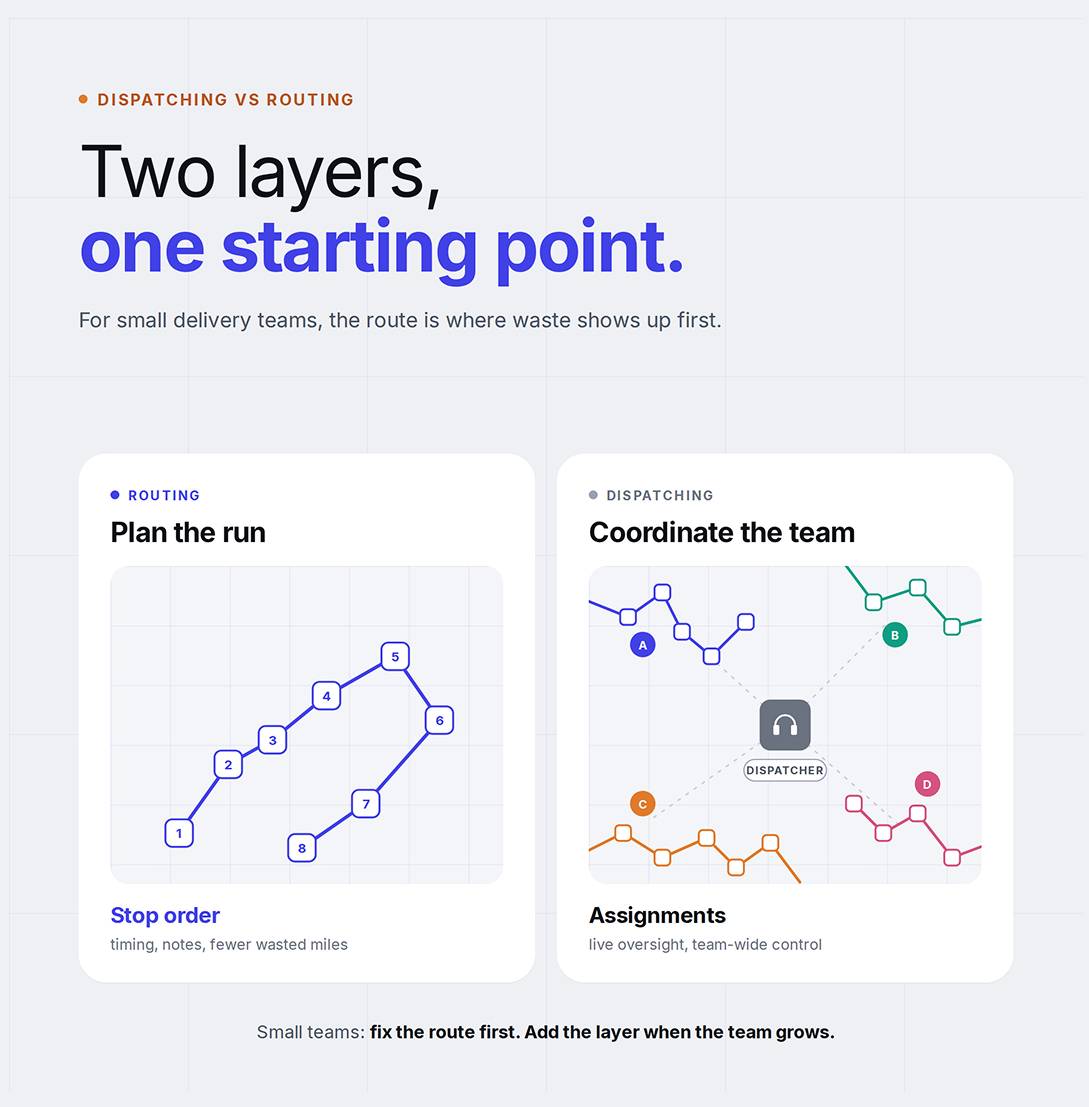
Dispatching vs Routing: Why Small Delivery Businesses Start With Route Optimization
Optiway explains why small delivery businesses usually get more value from better route optimization before adding heavier dispatch workflows.

Route Planning
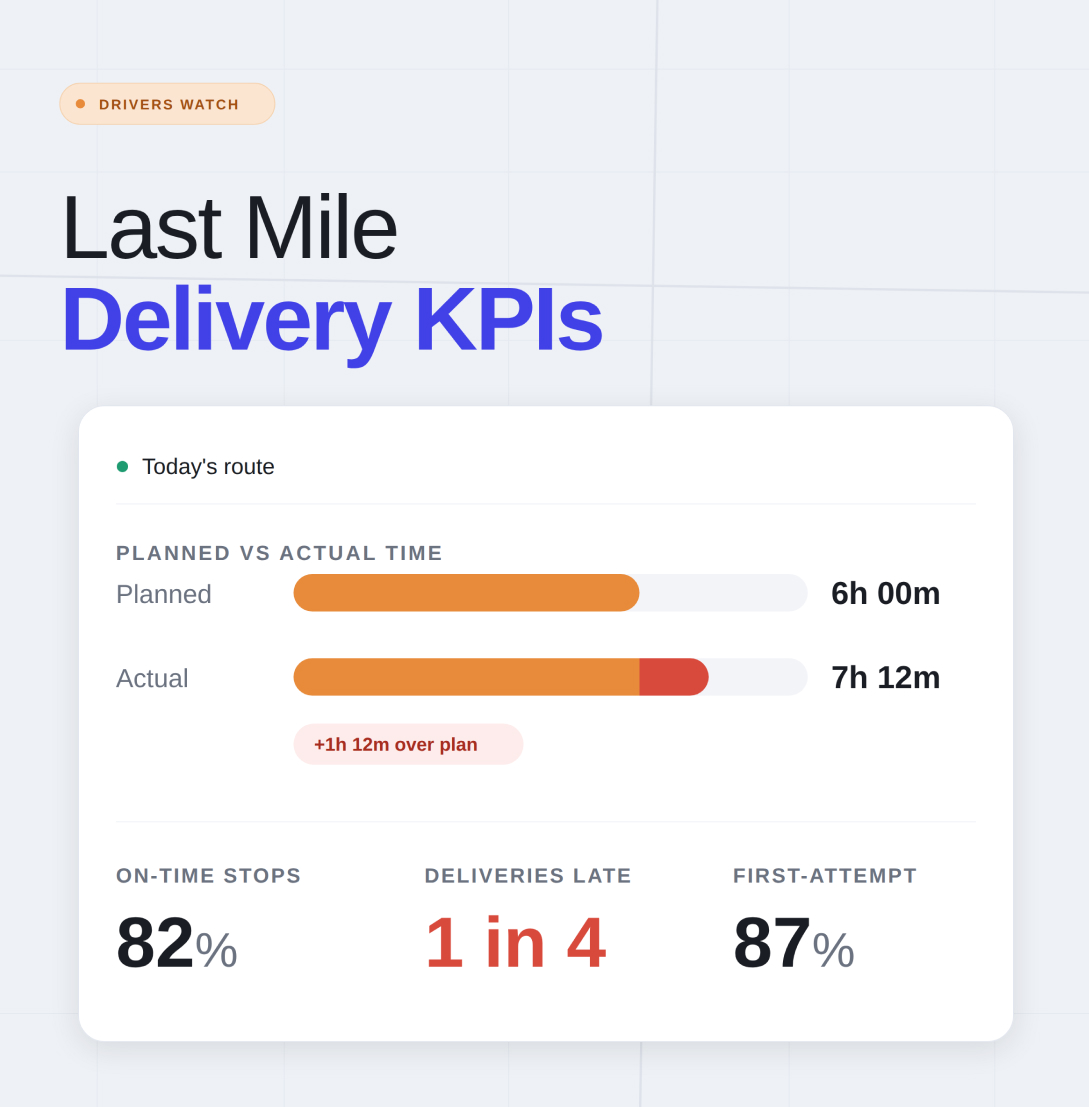
Most articles about last mile delivery KPIs sound like they were written for a control room full of managers staring at screens. That is not what most drivers need. A driver needs numbers that explain one simple thing: why today’s route felt smooth, messy, late, expensive, or harder than it should have been. The last mile is usually the most expensive and time-heavy part of delivery, which is exactly why the right numbers matter so much. Tracking the wrong ones can make a bad route look acceptable on paper.
For a route-first product like Optiway, the useful version of last mile delivery KPIs is not about overseeing a whole fleet. It is about spotting wasted miles, weak stop order, missed time windows, failed first attempts, and the little route decisions that quietly steal an hour from your day. Optiway is built around multi-stop route optimization, stop-by-stop ETAs, file import, notes, time windows, priority stops, one-tap navigation, and quick route edits when plans change. That makes it a natural fit for driver-level route improvement rather than dispatch workflows.
A useful KPI should guide operational decisions for the next day, not just explain what happened the day before. That is the real standard. If a metric does not help teams adjust stop sequencing, tighten delivery windows, resolve recurring access issues, or reduce inefficient cross-town travel, it has limited decision-making value on its own. Average delivery time is a relevant and widely used metric, but it is most effective when viewed alongside more operationally specific indicators. A route may show a healthy average while still experiencing late arrivals, unnecessary backtracking, building access delays, and inefficient spacing between stop clusters.
This is one of the clearest last mile delivery KPIs you can track because it exposes the gap between a route that looked good and a route that actually worked. If you expected to finish in six hours and you keep landing closer to seven, something is breaking the plan. It may be poor sequencing, too much distance between stop groups, overly tight windows, access delays, or extra detours added during the day.
This number becomes more useful when you stop treating it as a single total and start asking where the gap opens up. Did the route fall behind before lunch, or only after a certain neighborhood? Did the day unravel after a priority stop was added? Those patterns matter. Optiway gives drivers planned routes, stop-by-stop ETAs, and the option to edit, reorder, or re-optimize when the route changes, which makes this KPI much easier to act on.
If you use delivery windows, this KPI matters more than raw speed. Finishing fast is nice. Arriving at the right stop at the right time is what actually protects the route from turning chaotic. A driver who shows up twenty minutes early to one stop and thirty minutes late to the next has not really won anything.
This is where route optimization stops being abstract and becomes practical. Time windows force the route to respect reality. Optiway allows individual stops to carry earliest and latest arrival times, and those windows are considered during optimization. That makes this KPI especially useful because it reflects whether the route order and timing still hold up once the day begins moving.
A failed first attempt is one of the fastest ways to ruin an otherwise decent route. It does not just affect one stop. It can create extra mileage, throw off the remaining sequence, and drain time you were saving elsewhere. That is why first-attempt delivery rate deserves a place near the top of any list of last mile delivery KPIs.
When this number slips, the problem is often more ordinary than people think. The route may be fine, but the stop details are weak. Missing gate codes, unclear buzzer instructions, incomplete drop-off notes, or poorly timed arrivals can all push a delivery into a second attempt. Optiway supports notes for stops and time windows, which helps drivers arrive with better context instead of guessing at the door.
This KPI needs a little care because it can turn misleading if used as a blunt productivity number. Drivers do not run identical routes. Ten suburban stops are not the same as ten city-center apartment drops with parking headaches and building access delays. Still, as a route comparison tool, stops completed per hour is useful.
It helps you compare route shape from one day to the next. If the stop count is similar but output drops, the route may be too stretched, the order may be wrong, or the day may be overloaded with awkward windows. Optiway is designed for dense multi-stop runs, including routes with up to 200 stops, and the point of tracking this KPI is not to rush the driver. It is to see whether the route itself is helping or fighting the work.
Some routes feel busy. Some routes quietly burn fuel. Miles per stop helps you tell the difference. If this number starts creeping up, the route may be zigzagging across town, skipping between neighborhoods, or absorbing too many manual changes that break the original order.
This is one of the most practical last mile delivery KPIs because it connects directly to route design. A shorter path usually means less fuel, less wear, and fewer minutes lost between doors. Optiway says its route planning helps reduce drive time and delivery costs, and its product pages repeatedly frame value around shorter routes, faster planning, and lower fuel use from tighter sequencing. That makes miles per stop a strong route-quality signal for the site’s audience.
This is the hidden leak that drivers often feel before they ever measure it. Two routes can have the same number of stops and still behave completely differently because one wastes too much time in the gaps. Long turns between neighborhoods, awkward handoffs to map apps, repeated backtracking, and unnecessary loops all show up here.
A clean way to use this KPI is to look for stretch points. Which stop transitions consistently eat more time than they should? Which part of town seems to break the route flow? Optiway supports one-tap navigation in Apple Maps, Google Maps, Waze, and Here WeGo, along with stop reordering and re-optimization when the day changes. Those features do not remove every delay, but they help cut the friction that often grows between stops rather than at the stop itself.
Some routes are stable. Others keep getting interrupted. A stop is canceled. A new address is inserted. A high-priority drop has to move up. A customer asks for a tighter arrival range. That is why route change rate is one of the most revealing last mile delivery KPIs for small delivery businesses. It tells you how often the original plan stops being the real plan.
This matters because a route that changes often should not be judged by the same standard as a fixed list. The right question is not whether the day stayed perfect. The right question is whether the route could absorb change without falling apart. Optiway lets users add or remove stops, reorder stops while on the go, assign priority to a stop, and edit time windows before re-optimizing. That makes route change rate especially relevant for this product.
Fuel is where bad route design becomes expensive in a way nobody can ignore. You do not need a complicated system to track it. Even a simple weekly comparison can tell you a lot. If stop volume stays similar but fuel spend rises, something probably changed in the route pattern, the order of stops, or the amount of wasted driving between them.
This KPI works best when paired with miles per stop and planned vs actual finish time. Together, they tell a fuller story. A route may still get done, but if it takes longer and costs more fuel each week, the route is not healthy. Optiway openly positions route optimization as a way to save fuel and reduce drive time, so this metric fits naturally within the product’s value without turning the article into a management document.
One bad habit in last mile delivery KPI tracking is falling in love with totals that sound impressive but explain very little. Total deliveries completed can flatter a route that was actually messy. Average route duration can hide late-window failures. A single headline number may look clean while the real problems sit underneath it - long jumps between neighborhoods, repeated failed first attempts, or too many last-minute changes.
That is why route-level context matters. A good KPI should help a driver ask better questions. Where did the route lose shape? Which stops created repeat friction? What kind of changes turned a smooth plan into a scramble? That is far more useful than chasing neat-looking averages for their own sake.
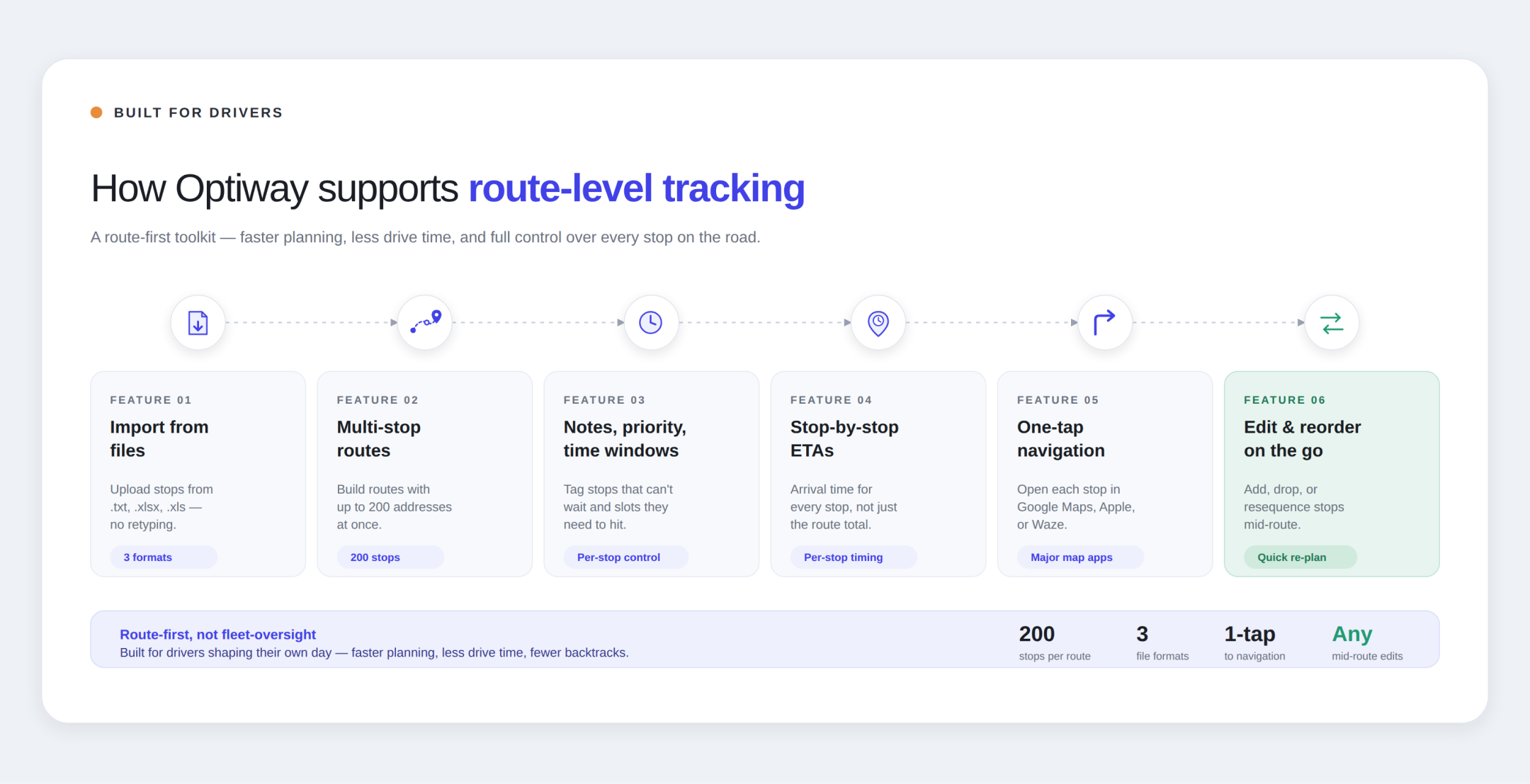
Optiway works best in a route-first article because its feature set lines up with the KPIs drivers can actually influence. Drivers can import stops from .txt, .xlsx, or .xls files, build routes with up to 200 addresses, add notes, set priority, assign time windows, get stop-by-stop ETAs, open navigation in major map apps, and edit or reorder the route when the day changes. The site also positions the product around faster planning and reduced drive time, which makes it a natural match for route-shape KPIs rather than dispatch, zone control, or fleet oversight content, especially for last-mile delivery operations for 3PL providers and local logistics.
That matters because the best version of last mile delivery KPIs is not corporate theater. It is practical feedback. A driver should be able to look at a route, look at a few honest numbers, and understand why the day felt smooth or why it dragged. If the numbers point to wasted miles, fragile time windows, or frequent rework, the next route can be built better. That is the whole point.
Last mile delivery KPIs are only useful when they stay close to the road. For drivers, that means tracking the numbers that reveal route quality: planned time versus actual finish, on-time arrivals, first-attempt success, stops per hour, miles per stop, time lost between stops, route changes, and fuel spend. Those are the numbers that lead to calmer days, cleaner routes, and fewer ugly surprises after the third stop. And for a route optimization product like Optiway, that is where the real value shows up.
Dispatching vs Routing: Why Small Delivery Businesses Start With Route Optimization
Optiway explains why small delivery businesses usually get more value from better route optimization before adding heavier dispatch workflows.
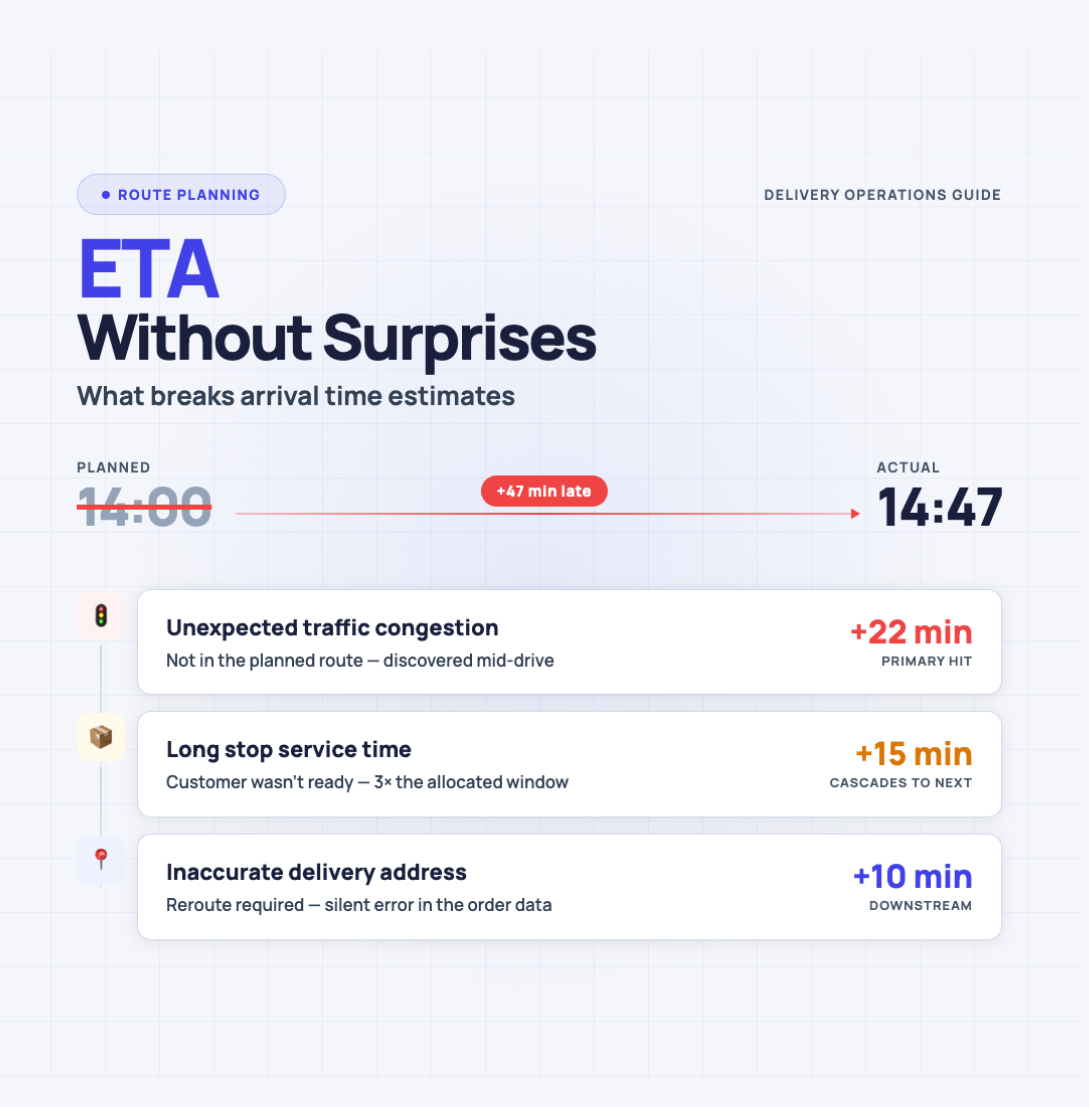
ETA without surprises - what breaks arrival time estimates
Optiway turns a chaotic stop list into calmer arrival windows — because parking hunts, gate codes, and detours always show up uninvited.
Why Google Maps Falls Short for Truck Routes
Where a navigation app stops being enough for commercial multi-stop routing.
Plan, assign and track every driver — live, from one dashboard.