
Grocery Delivery Route Planner App for On-Time Drop-Offs
Why Grocery and Food Routes Are Harder Than Standard Deliveries
Grocery runs carry pressure that most parcel routes never face. Perishable goods sit in temperature-controlled totes that cannot linger in traffic. Customers expect narrow time window deliveries and updates when something changes, substitutions happen at the store, and contactless drop-offs require careful notes.
One late stop can trigger a chain reaction that affects the rest of the shift. A grocery delivery route planner app helps protect freshness while keeping drivers moving through packed neighborhoods.
With a food delivery route planner app, you enjoy faster planning, fewer late arrivals, better communication with shoppers, and more completed drops before chilled items warm.
⚠️ Common pressure points in grocery delivery
Plan Multi-Stop Grocery Routes in Minutes
Morning prep sets the tone for the day. Drivers add stops (file upload or manual entry) and generate a full route before heading out. A delivery route planner for groceries focuses on speed here, so drivers are not waiting while routes get sorted.

Our grocery delivery route planner app accepts bulk inputs, groups addresses into a workable run, and produces an ordered sequence that drivers can follow immediately. Dense lists turn into readable plans without manual sorting across dozens of pins.
 Manual sorting (20 min)
Input addresses, manually plot each in Google Maps, mentally cluster by neighborhood.
 Manual entry: 15–20 min
Prone to errors
Manual entry: 15–20 min
Prone to errors
 Bulk import (< 2 min)
Upload an .xlsx of addresses — Optiway sorts stops automatically.
 Upload: 7 seconds
Route ready to drive
Upload: 7 seconds
Route ready to drive
Route Optimization That Protects Freshness and Punctuality
Route optimization for grocery delivery translates directly into shorter drive times and fewer late arrivals at doors. Stops appear in an order that limits zigzags across town and reduces idle minutes at intersections. Plus, chilled items stay cold longer because routes avoid unnecessary loops.
Our food delivery route planner app treats freshness as part of everyday routing, which means orders are delivered on time for optimal customer satisfaction.
Accurate ETAs for Every Stop and Better Delivery Windows
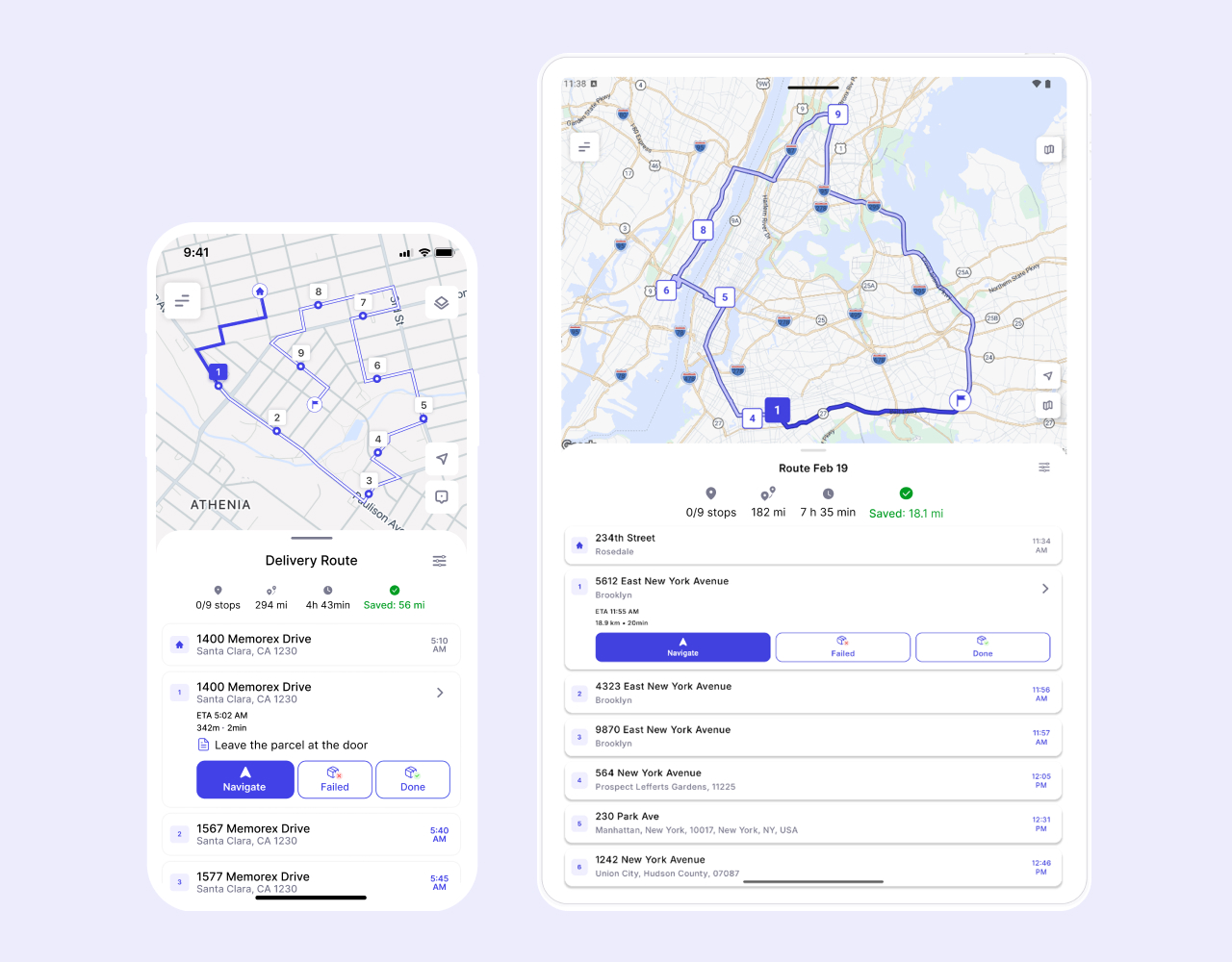
When delivery runs are tightly scheduled, drivers need reliable timing they can trust. Stop-by-stop ETAs inside the driver app help them pace the route and stay aligned with delivery windows.
A delivery route planner for groceries updates timing as traffic, substitutions, or store delays ripple through the route. As a result, fewer "where is my order" messages reach call centers.
Driver-Ready Navigation for Fast Handoffs at the Doorstep
When on the route, drivers need the next stop to be visible without scrolling. They also need an easy handoff to their preferred maps app so eyes stay up and hands stay off screens.
Our food delivery route planner app pairs navigation with stop notes such as gate codes, buzzer details, and instructions for contactless drop-offs. Since delivery preferences appear next to the address, drivers make fewer mistakes and do faster doorstep handoffs.
Handle Changes During the Shift Without Derailing the Route
Grocery days don't always stick to the original plan, as orders get cancelled, extra stops come up once stores release late batches, traffic backs up near shopping districts, and drivers may reach apartments where access suddenly changes.
Route optimization for grocery delivery supports those moments without forcing a reset. The position of stops changes, cancelled orders are removed, and the rest of the sequence updates. So, drivers keep moving through the route without delays.
Key Benefits for Grocery and Food Delivery Teams
Drivers need results that protect margins and customer trust during peak hours. Our food delivery route planner app helps in this regard with these benefits:


Core Features That Matter for Grocery Delivery Operations
The following features support the benefits mentioned above:


Common Grocery and Food Delivery Scenarios


Who This Is For: Owner Operators to Growing Fleets
Our grocery delivery route planner app is built for drivers who plan and optimize their own delivery runs in-app, including:


As route counts and driver pools grow, our delivery route planner for groceries helps drivers meet cold chain considerations, keep operations predictable across every neighborhood they serve.
100K+ drivers already use Optiway
Whether you're a single driver or a small team, planning routes should always be simple
Super easy to use and saves me at least an hour every day.
Before using this app, I was juggling addresses in Google Maps and wasting so much time stuck in traffic. What I love most is that I can reorder on the go when plans change, and the ETAs are always spot on. Honestly, it feels like having a dispatcher in my pocket.
I used to spend hours trying to plan my delivery routes. Now it takes minutes, and I finish my day earlier.
Try Optiway for Free Now
No credit card. No setup fee. Optimize your first route in under 2 minutes.
Try for Free NowOptiway Route Planner FAQs
Everything you need to know before you start
What is Optiway Route Planner and who is it for?
Optiway is a route planner designed for delivery drivers and local businesses. It helps you organize stop lists into an efficient route, reduce driving time, and stay on schedule throughout the day.
It's a great fit for couriers, pharmacies, florists, field service professionals, and any business that runs daily local deliveries.
How many stops can I add per route?
You can add and optimize up to 200 stops per route.
How is Optiway different from Google Maps?
Google Maps is mainly a navigation tool. If you add multiple stops, it typically keeps them in the order you entered — it doesn't automatically optimize the sequence.
Optiway is built specifically for multi-stop route optimization. It automatically reorders your stops into the most efficient route, so you drive less, save time, and finish faster.
Can I use Optiway for a small team or just one driver?
Optiway works perfectly for solo drivers and small teams where each driver creates and manages their own route.
Can I export routes, ETAs, and logs for accounting?
Yes. You can generate route reports in PDF or Excel format for accounting and record-keeping purposes.
Reports include route details, stop information, ETAs, and activity logs to help you document completed deliveries and track daily operations.
Does Optiway Route Planner support time windows?
Yes. You can set delivery time windows for individual stops. Optiway considers them during optimization to help you stay within schedule.
Is there a free trial, and how does billing work?
Yes. You can start with a free trial.
After the trial ends, your subscription renews automatically unless canceled through your App Store or Google Play account. You can cancel anytime in your store settings.
You may also like...
Visit BlogBest Way to Plan Truck Routes: Why Google Maps Isn't Always Enough
Explore why Google Maps isn't always enough for commercial truck routing and how Optiway provides smarter, compliant, and optimized truck route planning.
Fastest Route vs Shortest Route: Which One Is Better for Delivery?
Understand the key differences between fastest and shortest routes, and learn which option can save more time and fuel for your delivery operation.
Plan your first optimized route today
Get the app now and optimize your first delivery route in minutes.
Try for Free Now
Optiway Web – Early Access
Get early access with exclusive discounts and priority onboarding. Limited spots available.