
Furniture Delivery Route Planner App for Large Items

Challenges of Large Item Delivery Route Planning
Making large-item deliveries is operationally different from small packages. Sofas, refrigerators, mattresses, and sectionals take up significant vehicle space. Some require two-person crews, while others need stair carries, elevator coordination, or tight driveway access.
For logistics managers and dispatchers, a single delay can push back the entire day because each stop is longer and more labor-intensive. Unlike small deliveries, heavy goods cannot simply be left at the doorstep and marked completed.
⚠️ Common operational pain points include:
 Inefficient route distribution across crews and trucks
Delays
Inefficient route distribution across crews and trucks
Delays
 Oversized item scheduling conflicts that exceed vehicle capacity
Capacity issues
Oversized item scheduling conflicts that exceed vehicle capacity
Capacity issues
 Missed time windows that trigger costly rescheduling
Missed windows
Missed time windows that trigger costly rescheduling
Missed windows
 Long service times per stop due to assembly or placement
Long service time
Long service times per stop due to assembly or placement
Long service time
 Poor sequencing that forces trucks to crisscross town with half-full loads
Inefficient routing
Poor sequencing that forces trucks to crisscross town with half-full loads
Inefficient routing
 Limited visibility into how traffic affects tight appointment windows
Traffic blind spots
Limited visibility into how traffic affects tight appointment windows
Traffic blind spots
Without a dedicated furniture delivery route planner app, teams have to rely on manual pin drops or dispatcher guesswork. That approach might work for 10 stops. It does not scale well to 40, 80, or up to 200 stops in a day. Small inefficiencies can turn into overtime costs, repeat visits, and frustrated customers.
How a Furniture Delivery Route Planner App Solves These Problems
A purpose-built furniture delivery route planner app replaces guesswork with automation. Dispatchers don't have to manually sort addresses and estimate drive times. Now, they can upload stop lists and generate an optimized route in minutes.
 Manual sorting (20 min)
Input addresses, manually plot each in Google Maps, mentally cluster by neighborhood.
 Manual entry: 15–20 min
Prone to errors
Manual entry: 15–20 min
Prone to errors
 Bulk import (< 2 min)
Upload an .xlsx of addresses — Optiway sorts stops automatically.
 Upload: 7 seconds
Route ready to drive
Upload: 7 seconds
Route ready to drive
Since heavy goods occupy significant cargo space, route structure matters more than ever. Poor sequencing can leave a truck stuck in traffic, with its largest delivery scheduled last, even though it should have been completed earlier to free up space.
With intelligent route optimization, large and bulky items move in an order that supports operational flow. Teams spend less time driving in circles and more time completing deliveries.
Driver communication also improves. Each stop includes notes, such as access codes, placement instructions, and special handling requirements. When delivery routing software for large items keeps all details in one place, fewer mistakes happen at the doorstep.
Key Features Built for Heavy and Bulky Item Delivery
Besides map optimization, an efficient bulky item delivery planner should support high-volume, space-sensitive operations. Our app offers:


Benefits for Furniture and Appliance Retailers
For small to mid-sized furniture stores, regional appliance chains, and 3PL partners handling heavy goods, margins depend on efficiency. Route planning software for furniture directly impacts fuel usage, crew hours, and customer satisfaction.
When routing improves, so does return on investment (ROI). Key advantages include:


Why Optiway Is Ideal for Big-Item Route Planning
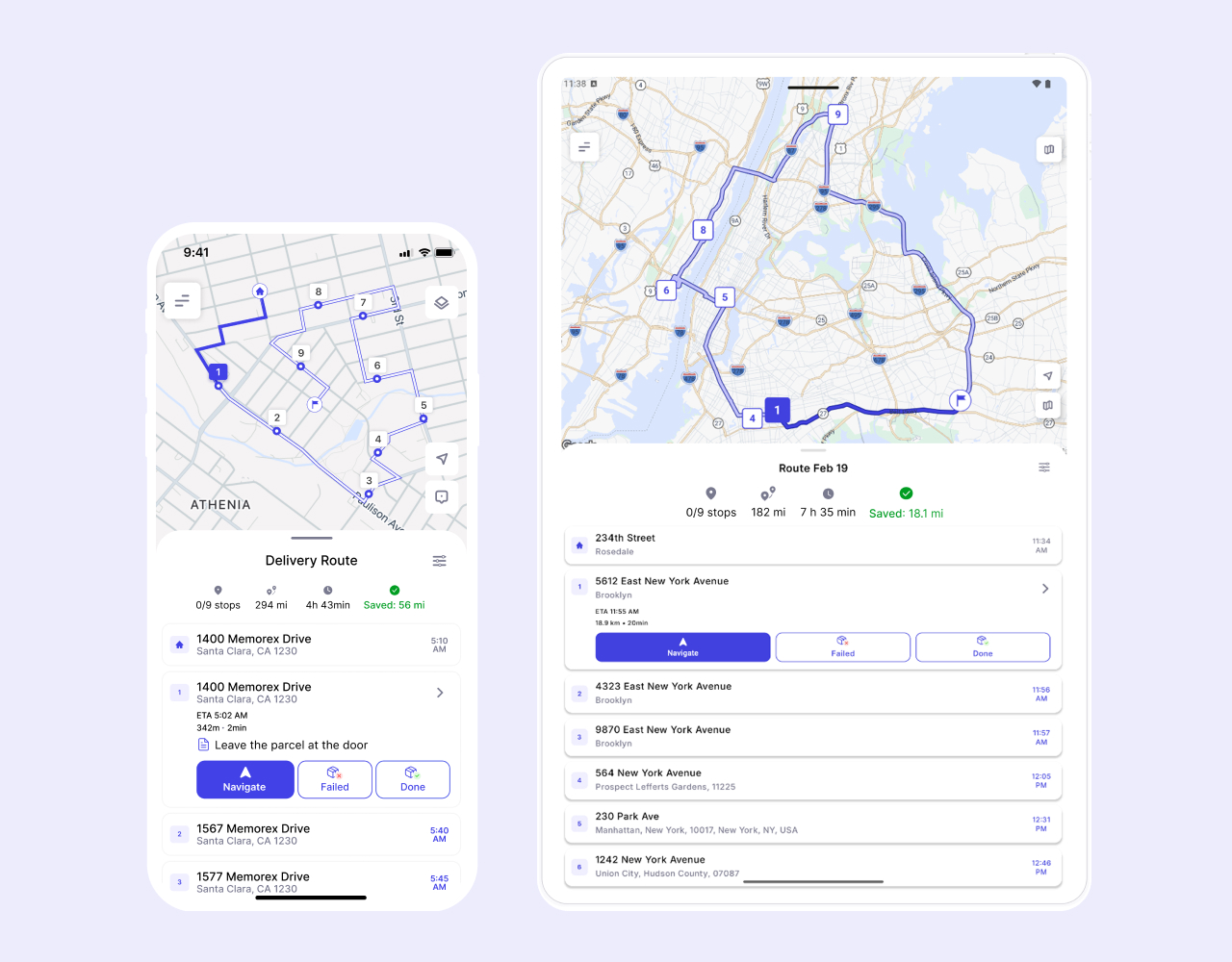
Optiway simplifies route planning for teams that do not have time for complicated dispatch systems. The interface is clean and intuitive, so delivery drivers can generate optimized routes quickly without extensive training.
As a mobile delivery planning app, Optiway supports both planning and execution. Routes can be planned and completed in Optiway on a phone or tablet. This enables drivers to create their own routes, and in the future teams can manage and assign routes through the web platform.
Compared to manual or static mapping tools, Optiway offers intelligent sequencing and real-time traffic adjustments throughout the shift. The app handles large routes (up to 200 stops) and lets you export a route progress and delivery details reports.
Our furniture delivery planning app keeps operations scalable without adding dispatch complexity. For logistics managers, this means consistent performance whether handling 20 stops or 200.
Start Routing Your Large Deliveries with Confidence
Heavy-item logistics require precision. Large sofas, appliances, and assembled furniture pieces cannot be treated like small parcels. Every route must consider time, traffic, and customer availability.
Optiway helps businesses plan smarter routes for big and bulky furniture deliveries without the stress of manual scheduling. The system supports the full delivery cycle, including bulk uploads, traffic-aware optimization, driver-ready navigation, and more.
If you manage furniture or appliance deliveries and want more predictable days, fewer reschedules, and better use of every truck, sign up on Optiway to explore how it can streamline your large-format routes.
100K+ drivers already use Optiway
Whether you're a single driver or a small team, planning routes should always be simple
Super easy to use and saves me at least an hour every day.
Before using this app, I was juggling addresses in Google Maps and wasting so much time stuck in traffic. What I love most is that I can reorder on the go when plans change, and the ETAs are always spot on. Honestly, it feels like having a dispatcher in my pocket.
I used to spend hours trying to plan my delivery routes. Now it takes minutes, and I finish my day earlier.
Try Optiway for Free Now
No credit card. No setup fee. Optimize your first route in under 2 minutes.
Try for Free NowOptiway Route Planner FAQs
Everything you need to know before you start
What is Optiway Route Planner and who is it for?
Optiway is a route planner designed for delivery drivers and local businesses. It helps you organize stop lists into an efficient route, reduce driving time, and stay on schedule throughout the day.
It's a great fit for furniture retailers, appliance delivery teams, 3PL partners, and any business that runs large-item or heavy-goods deliveries on a regular basis.
How many stops can I add per route?
You can add and optimize up to 200 stops per route.
How is Optiway different from Google Maps?
Google Maps is mainly a navigation tool. If you add multiple stops, it typically keeps them in the order you entered — it doesn't automatically optimize the sequence.
Optiway is built specifically for multi-stop route optimization. It automatically reorders your stops into the most efficient route, so you drive less, save time, and finish faster.
Can I use Optiway for a small team or just one driver?
Optiway works perfectly for solo drivers and small teams where each driver creates and manages their own route.
Can I export routes, ETAs, and logs for accounting?
Yes. You can generate route reports in PDF or Excel format for accounting and record-keeping purposes.
Reports include route details, stop information, ETAs, and activity logs to help you document completed deliveries and track daily operations.
Does Optiway Route Planner support time windows?
Yes. You can set delivery time windows for individual stops. Optiway considers them during optimization to help you stay within schedule.
Is there a free trial, and how does billing work?
Yes. You can start with a free trial.
After the trial ends, your subscription renews automatically unless canceled through your App Store or Google Play account. You can cancel anytime in your store settings.
You may also like...
Visit BlogBest Way to Plan Truck Routes: Why Google Maps Isn't Always Enough
Explore why Google Maps isn't always enough for commercial truck routing and how Optiway provides smarter, compliant, and optimized truck route planning.
Fastest Route vs Shortest Route: Which One Is Better for Delivery?
Understand the key differences between fastest and shortest routes, and learn which option can save more time and fuel for your delivery operation.
Plan your first optimized route today
Get the app now and optimize your first delivery route in minutes.
Try for Free Now
Optiway Web – Early Access
Get early access with exclusive discounts and priority onboarding. Limited spots available.