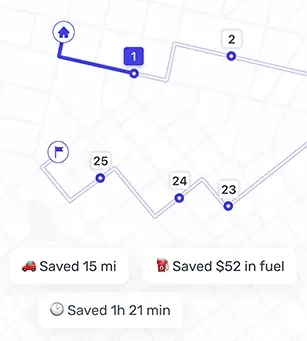

That's where advanced route planning tools like Optiway come in, built with commercial vehicle routing and business logistics in mind.
How to Find Truck Routes on Google Maps
Using Google Maps to plot a truck route generally involves:
- Entering your pickup and drop‑off locations.
- Adding additional stops manually by clicking the "Add stop" button.
- Previewing roads with satellite view or street view to check intersections and turns.
These tools are useful for basic navigation and can show real‑time traffic conditions. But Google Maps doesn't distinguish between cars and commercial trucks in its routing logic, meaning you could be steered onto roads that aren't ideal for heavy or oversized vehicles.

Limitations of Google Maps for Truck Routing
Google Maps isn't designed to handle the complexities unique to commercial truck routes:
- No truck‑specific restrictions — It doesn't consider bridge heights, load limits, narrow roads, or hazmat zones that matter for truck safety.
- Manual multi‑stop entry — Adding many stops becomes a repetitive and error‑prone task without proper optimization tools.
- No vehicle type customization — Google Maps lacks settings for truck dimensions, so routes may not be safe or compliant.
- No support for delivery windows — You can't tell Google Maps when a delivery must arrive or what service times are required.
- No business insights — There's no reporting, analytics, or proof of delivery tracking for operations teams.
For business fleets and professional drivers, these gaps are more than just inconveniences — they translate into costly delays, missed windows, higher fuel use, and unnecessary wear and tear.
Why Businesses Need a Truck‑Focused Routing Tool
Handling truck routes professionally means accounting for compliance, efficiency, safety, and predictability. Important requirements include:
- Legal compliance with weight and road restrictions.
- Fuel‑efficient paths that reduce mileage and idling time.
- Traffic updates with rerouting options.
- Delivery performance reporting and proof of arrival.
Specialized navigation solutions are built to factor in all these considerations and help logistics operations avoid costly mistakes that basic tools can't prevent.
What Makes Optiway Better for Truck Routing
Optiway offers a suite of features tailored to how commercial traffic actually works:
- Vehicle‑specific routing — Routes are calculated using truck size and weight to avoid hazards and legal issues.
- Time windows and priority support — You can build routes around required delivery time slots and customer priorities.
Real‑World Alternatives to Google Maps
Because Google Maps doesn't provide truck‑aware routing, many commercial drivers and fleets choose dedicated GPS and planner apps:
- Route4Me — Tailors routes based on vehicle specs and local restrictions.
- RoadWarrior — Optimizes multi‑stop routes with turn‑by‑turn directions and traffic alerts, saving time and fuel compared to Google Maps.
These tools are built with real commercial use in mind, unlike Google Maps' more generic navigation model.
When to Use Google Maps vs. Optiway
| Use Case | Google Maps | Optiway |
|---|---|---|
| Basic navigation | ✅ | ✅ |
| Planning a day with many stops (multi‑stop route) | Up to 10 stops ⚠️ | ✅ |
| Truck‑specific restriction routing | ❌ | ✅ |
| Optimizing stop order to reduce detours and wasted miles | ❌ | ✅ |
| Quickly adding a long stop list (paste/import) | ❌ | ✅ |
| Delivery windows and performance metrics | ❌ | ✅ |
| Organizing route execution (stop list + Done/Failed statuses) | ❌ | ✅ |
Google Maps remains a popular tool because it's fast and familiar for everyday driving. But for commercial fleets and truck routing that must respect regulations and optimize schedules, it simply wasn't designed to handle that complexity.
Optiway fills that gap with truck‑aware routing, multi‑stop sequencing, live updates, and analytics that help businesses save time, fuel, and money while improving delivery reliability. If you're serious about truck routing at scale, it's time to move beyond basic navigation. Try Optiway to see how logistics‑grade routing transforms your operations.