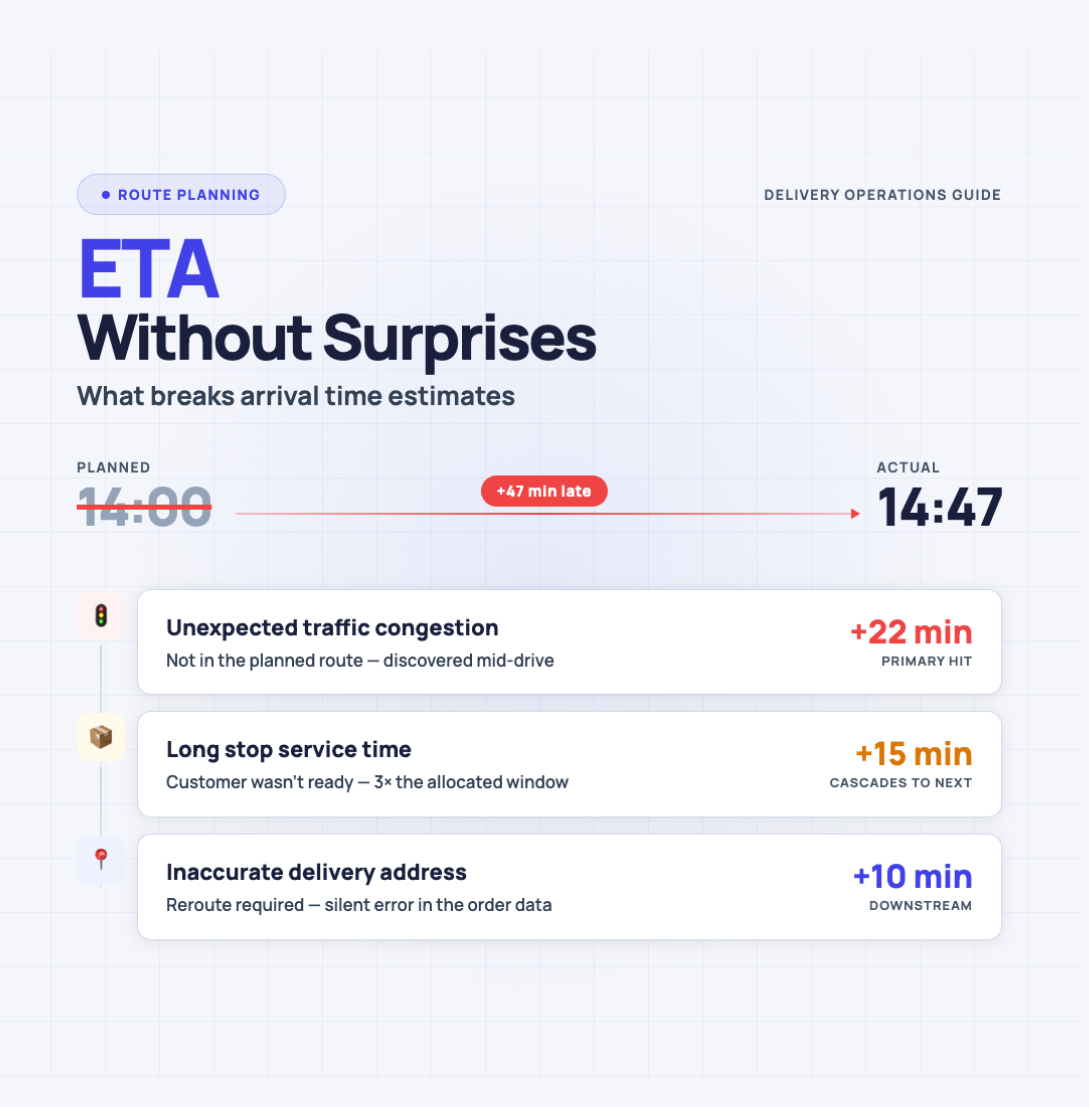
Most ETA problems start the same way — with a number that sounds confident.
“Ten minutes.”
Then reality happens: the address pin is off by a block, the elevator is out, the customer wants “just one quick thing,” and the street you planned to use is now one lane. The ETA wasn’t lying — it was missing context.
This article is about that missing context. We’ll break down what ETA actually means (and what it doesn’t), why arrival‑time estimates drift, and how to build ETAs you can say out loud without immediately regretting it — especially when you’re running multi‑stop days.
ETA, ETD, ETC — the three-letter soup that causes most misunderstandings
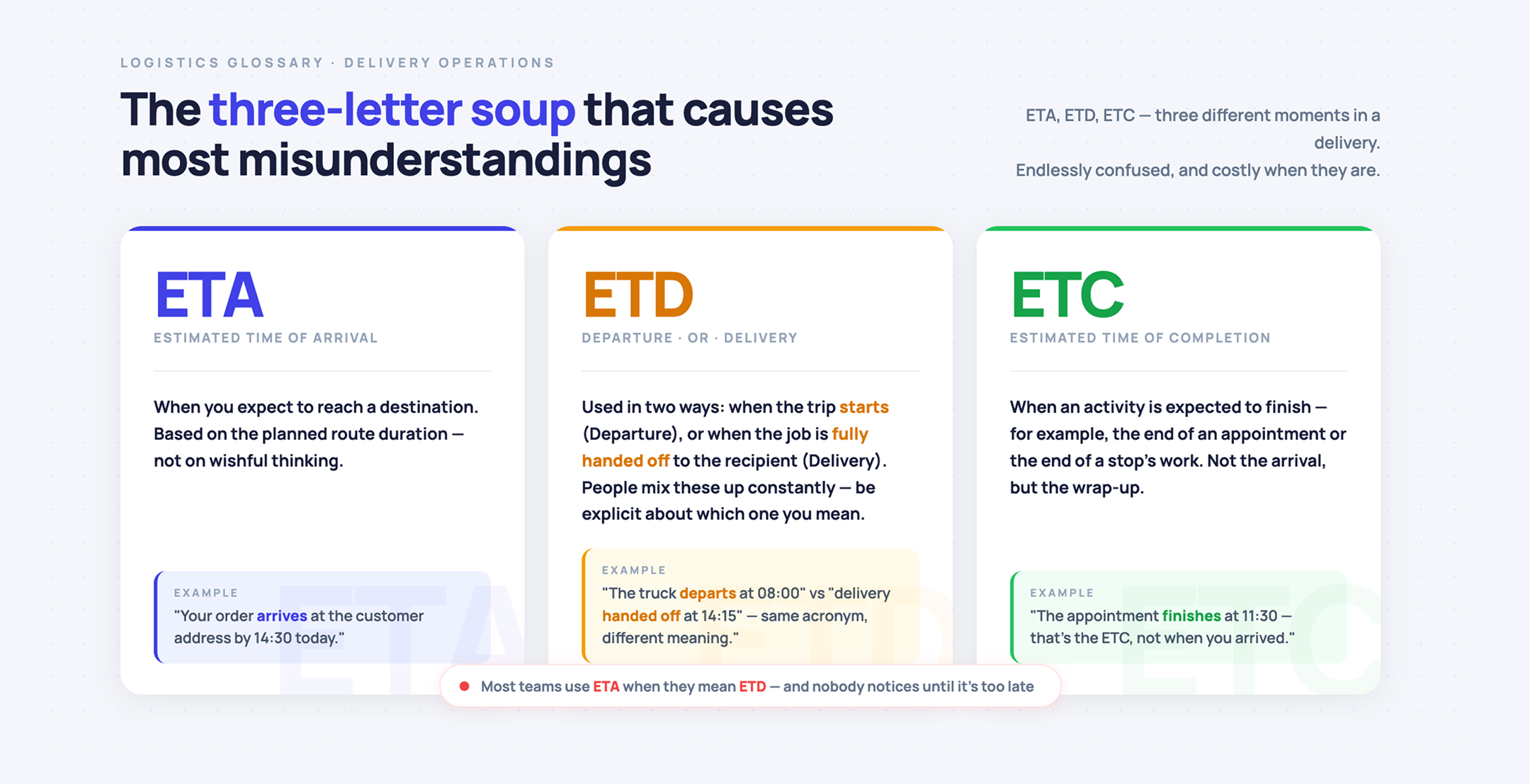
ETA (Estimated Time of Arrival) is the time you expect to reach a destination. It’s based on the planned duration of the route — not on wishful thinking.
ETD is tricky because it’s used in two common ways:
- Estimated Time of Departure — when the trip starts.
- Estimated Time of Delivery — when the job is fully handed off to the recipient.
In practice, people mix these up constantly, so it helps to be explicit about which one you mean.
ETC (Estimated Time of Completion) is when an activity is expected to finish — for example, the end of an appointment or the end of a stop’s work.
ETA is not the same as “done”
Arrival time and completion time often diverge. You can “arrive” and still spend 12 minutes parking, walking, getting through a lobby, and finding the right door. That gap is where most ETA promises go to die.
Why ETAs get emotional (and expensive) fast
An ETA isn’t just a timestamp. It’s a commitment that other people plan around. When it slips, the impact is rarely neutral:
- A customer waits and starts calling.
- Your next stop gets squeezed, and the whole day starts domino‑ing.
- You rush, miss details, or make a bad decision (like skipping food, breaks, or safe parking).
- Everyone loses trust in “the estimate,” so they stop using it — which defeats the point.
So the goal isn’t “perfect accuracy.” The goal is fewer surprises and smaller misses.
What breaks arrival time estimates (and why it keeps happening)
A simple ETA formula exists — time equals distance divided by speed. It’s also the reason so many ETAs are wrong. Real trips have extra variables: intermediate stops, stop duration, refueling, weather, traffic, and a pile of small delays that don’t show up in a straight‑line calculation.
Here are the biggest ETA breakers, in plain language.
1) Bad address data and messy location inputs
- “123 Main St” might be a long building with multiple entrances.
- A suite number changes the walking path.
- A typo creates a different street with the same number.
If the destination is wrong, every minute after that is fantasy.
2) Weak geocoding (pin in the wrong place)
Even when the address is “correct,” the map pin can land behind the building, on the wrong side of a divided road, or at a loading entrance you can’t use. The app can route perfectly to the wrong spot.
3) Stop time is not a rounding error
Stop duration is often the largest unknown in multi‑stop days:
- parking + access
- waiting for someone to answer
- paperwork
- “quick extra request”
- taking photos, signatures, notes
If you treat each stop as “2 minutes,” your ETA will look great until noon. Then it collapses.
4) The first stop and the last stop are different animals
The first stop is influenced by:
- late starts
- loading your day mentally (and physically)
- leaving a parking lot, not a highway ramp
The last stop is influenced by:
- fatigue
- decision shortcuts
- accumulated delays
Averages don’t capture this.
5) Time-of-day congestion (without needing “real-time” anything)
You don’t need live road feeds to know patterns exist:
- school drop‑offs
- lunch‑hour density
- evening choke points
- weekend event areas
A route that’s “25 minutes” at 11:00 can be “42 minutes” at 16:30.
6) Route geometry problems
Multi‑stop planning isn’t “A to B.” It’s a chain of small decisions:
- stop order
- backtracking
- left‑turn‑heavy paths
- dead‑end neighborhoods
- highways vs local roads tradeoffs
A single bad sequence can quietly add an hour.
7) Human interruptions
Calls, texts, bathroom breaks, coffee, wrong turns, searching for parking — none of these are rare. They’re normal. If your ETA model assumes you are a robot, it will disappoint everyone.
8) Constraints you didn’t model (even if they’re not “in the app”)
Not every constraint belongs inside software. But you still need to acknowledge:
- buildings with restricted access times
- customers who only accept within a window
- places where parking is consistently slow
You don’t have to “optimize everything.” You do have to plan like the world is imperfect.
9) Weather and road works
Not much to explain here. A day can flip from routine to chaotic quickly, and even “light” changes add minutes everywhere.
10) Overconfident communication
The fastest way to create an ETA problem is to communicate an exact minute when you should have communicated a window.
“2:17 PM” sounds like you’re certain.
“2:15–2:35” sounds like you’ve done this before.
A better mental model — ETA is driving time + stop time + buffer
If you want ETAs that hold up, build them from components:
- Drive time between stops (based on the route you actually plan to take)
- Service time at stops (your real‑world average, not a guess)
- A buffer (because surprises are not optional)
That’s the core upgrade from the naive distance/speed formula.
Where Optiway fits — turning a stop list into a schedule you can trust
Optiway is built around a simple reality: many people are doing multi‑stop days and need arrival times per stop, not just “when I get there eventually.” On the product side, it focuses on planning your route type, adding stops quickly, optimizing the stop order, and generating ETAs for each stop.
Here’s a practical workflow that keeps ETAs sane, without pretending the day will stay perfectly stable.
Step 1) Decide what “arrival” means for your day
Are you planning:
- a one‑way route
- a round trip back to the start
Optiway supports both — and that decision matters because your last‑stop ETA changes when “home” is part of the route.
Step 2) Get stops into the plan fast, without manual retyping
Manual entry is slow and error‑prone. Optiway supports adding stops manually, and it also supports importing stops (including via .txt or .xlsx).
Less typing means fewer mistakes, and fewer mistakes means fewer “why am I on the wrong street” minutes.
Step 3) Add the context that usually breaks ETAs
A clean address is good. A realistic stop is better.
Optiway lets you attach notes, set priority, and use time windows for stops.
That’s exactly the kind of context that prevents “perfect route, impossible schedule.”
Step 4) Optimize — then sanity‑check like a human
Optimization gives you a strong baseline for stop order and driving time. Optiway also lets you skip optimization if you need to preserve a specific order.
After that, do a quick sanity check:
- Are there any stops with known parking friction?
- Any buildings with slow access?
- Any time windows that will force waiting?
If yes, your ETA needs a buffer, not optimism.
Step 5) Use navigation you already trust
Optiway can open routes in Apple Maps, Google Maps, Waze, or Here WeGo.
That matters because the best ETA model in the world still fails if you get bounced between apps or waste time copying addresses.
Step 6) When the day changes, update the plan — don’t keep driving on yesterday’s math
Stops get added, removed, rearranged. When that happens, the ETA chain changes too.
Optiway supports editing a route (add, remove, or modify stops) and then re‑optimizing or keeping the existing order.
The point is simple: when inputs change, your ETA should change with them.
Time windows — the simplest fix for overpromising
If you do just one thing to reduce ETA drama, do this:
Stop promising a single minute. Start promising a window.
Optiway supports setting an earliest and latest time for a stop, and that window can be used during optimization so the plan respects it.
Windows are not a cop‑out. They’re honesty with structure.
A note on what Optiway is not trying to do
To keep expectations clean:
- Optiway is about planning routes and stop timing — it does not include load or capacity constraints in the app.
- ETA outputs are advisory and depend on external factors like traffic, road works, signage, and weather.
That’s not a weakness. It’s the reality of arrival‑time estimates.
The ETA you want is the one that survives contact with the day
You can’t eliminate delays. You can eliminate the chaos that comes from pretending delays won’t happen.
The playbook is straightforward:
- Define what “arrival” actually means (arrival vs completion).
- Build ETAs from route time + stop time + buffer.
- Use time windows instead of one‑minute promises.
- Update the plan when stops change.
That’s how you get “ETA without surprises” — not because the world became predictable, but because your estimate finally started respecting the parts that usually break it.