Best Route Planner App for Same Day Delivery Drivers
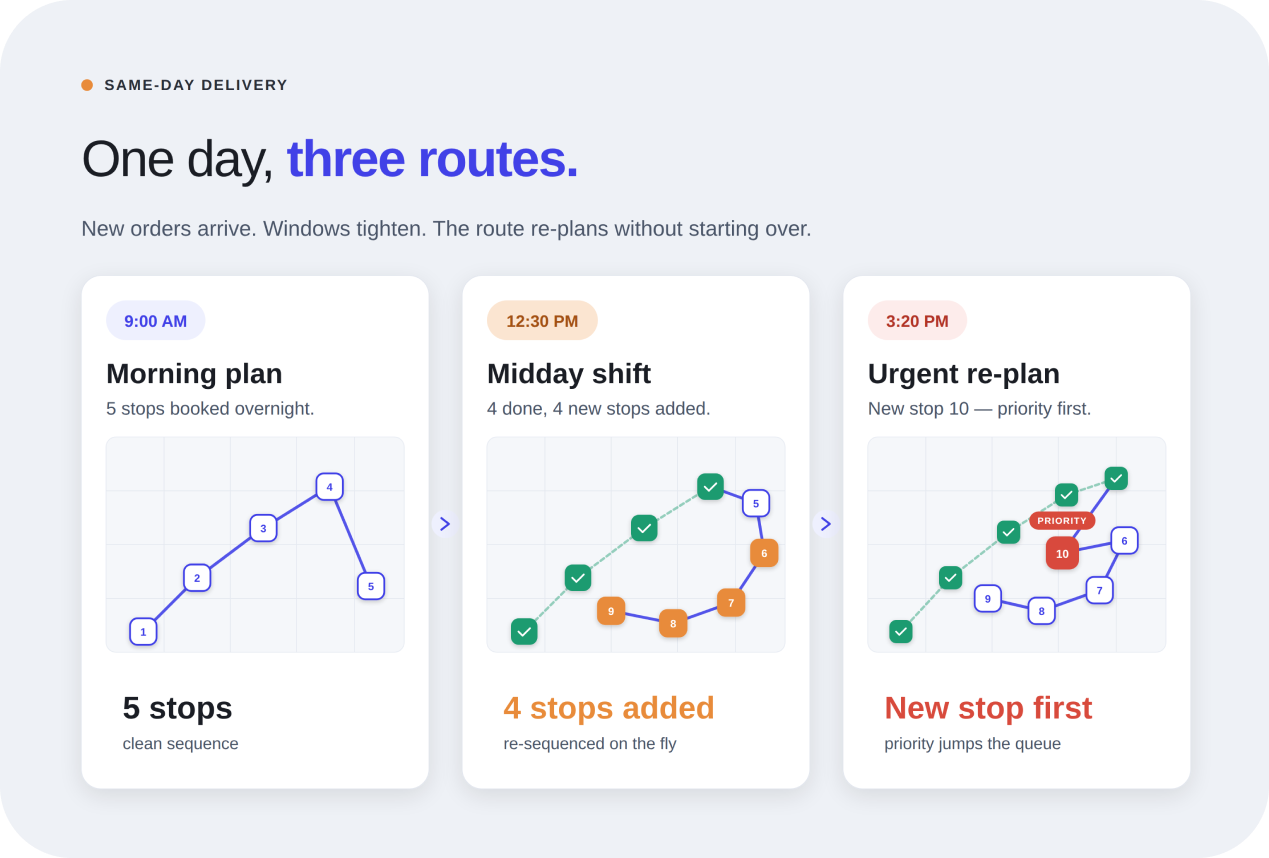
Same-day delivery gets messy fast when routes change by the hour. Optiway helps drivers plan smarter stops, save time, and keep ETAs under control.

Route Planning
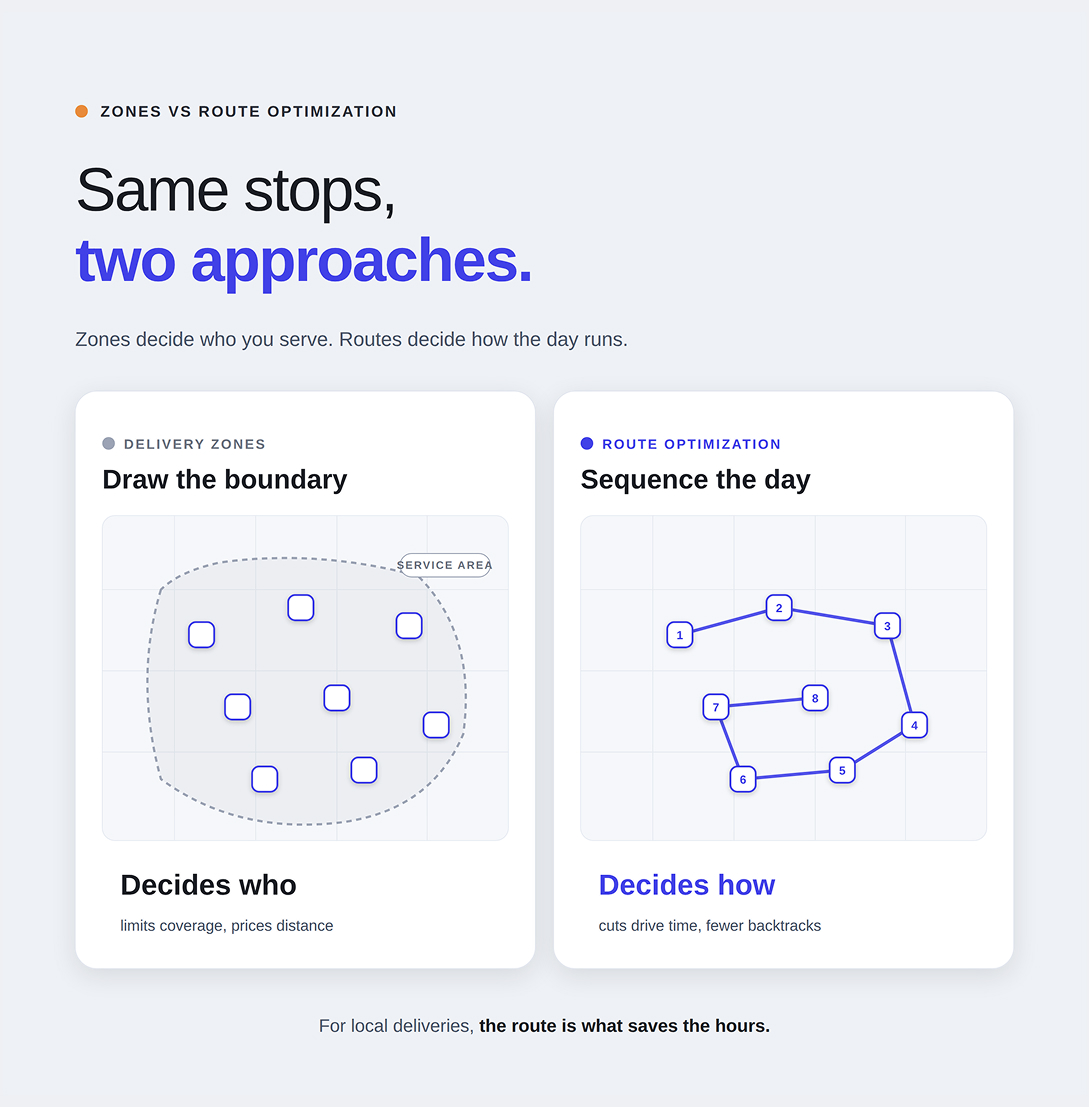
People often search for delivery zones for small business when they are really trying to solve a broader problem: deliveries feel expensive, routes feel messy, and the day takes longer than it should. The trouble is that “zones” can mean two very different things. In parcel shipping, carriers use shipping zones to price deliveries based on how far a package travels from origin to destination. In local delivery, small businesses often use “delivery zones” as a loose way to describe service areas on a map. Those are related ideas, but they do not solve the same problem.
That distinction matters for Optiway. On its public site, Optiway presents itself as a route planning and route optimization tool for solo drivers and small teams. It highlights stop import, notes, priority stops, time windows, stop-by-stop ETAs, one-tap navigation, and the ability to add, remove, or reorder stops when plans change. In other words, it is built to improve the route itself, not to manage service-area maps.
If you strip the jargon away, shipping zones are just distance bands used by carriers. USPS explains that its National Zone Charts Matrix helps mailers determine how far a mailpiece travels based on origination and destination ZIP Codes, and that postage for certain classes is based on both weight and distance. Pitney Bowes makes the same point in plainer ecommerce language: the farther the package travels, the higher the zone tends to be, which usually means higher cost and longer delivery times.
That is why carrier zones matter so much for ecommerce merchants shipping through USPS, UPS, or FedEx. They shape price, delivery speed, and even bigger decisions like where inventory should sit. Pitney Bowes also notes that businesses use zone logic when comparing carriers, planning warehouse placement, and deciding how to price shipping at checkout. For a national parcel operation, that is a real lever.
There is a reason delivery zones for small business sounds appealing. Zones feel neat. They suggest control. Draw a boundary, promise service inside it, and avoid the long awkward deliveries outside it. For businesses shipping through parcel carriers, zone-based thinking can absolutely help explain why one shipment is cheap and another is painfully expensive. For businesses setting basic local coverage rules, a simple map boundary can also prevent overpromising.
But zones are often mistaken for a time-saving tool when they are really a policy tool. They can help decide whether you should serve an address, how far an order is from origin, or why certain deliveries cost more. They do not tell you the best order for twelve stops across town. They do not reduce backtracking. They do not protect a narrow delivery window on stop seven. They do not rescue a route after a new stop gets added at noon. That is where route optimization becomes the more practical answer. This is an inference based on how carrier zone systems work and on the features Optiway emphasizes for daily route planning.
Zones help most when your business problem starts before the route exists. They are useful when you are pricing shipping, choosing whether to serve distant areas, comparing national carrier options, or thinking about where inventory should sit to reduce average distance. Pitney Bowes leans heavily on those use cases because its article is written for ecommerce fulfillment and shipping software. In that context, the advice makes sense.
They help far less once the packages are already going out in one local run. At that point, the distance band is only part of the story. The real time drain usually lives inside the route: bad stop order, unnecessary loops, poor clustering, weak timing, or too much manual reshuffling. Optiway’s product pages focus on exactly those route-level problems by emphasizing faster planning, reduced drive time, up to 200 stops per route, editable routes, and features like notes, priority, and time windows for each stop.
If your business runs its own deliveries, time is usually lost in motion, not in the abstract idea of coverage. A route that zigzags across neighborhoods can burn an hour without adding a single new customer. A badly timed stop can throw off the whole afternoon. A missing note can turn a quick handoff into a parking and phone-call problem. These are the kinds of issues route optimization is built to solve.
Optiway frames its value around making delivery routes faster and easier to plan. Users can save up to 30% of drive time and delivery costs, get precise ETAs for every stop, import addresses from text or spreadsheet files, navigate with common map apps, and update the route when plans change. That is a very different promise from zone management. It is closer to the daily reality of a driver trying to finish cleanly and get home earlier, especially for small business deliveries with multiple stops.
This is why, for many businesses, delivery zones for small business are not the first lever to pull if the real complaint is “our route takes too long.” If the route already includes all the stops you intend to serve, then the fastest gain often comes from improving sequence, timing, and route flexibility rather than drawing tighter circles on a map.
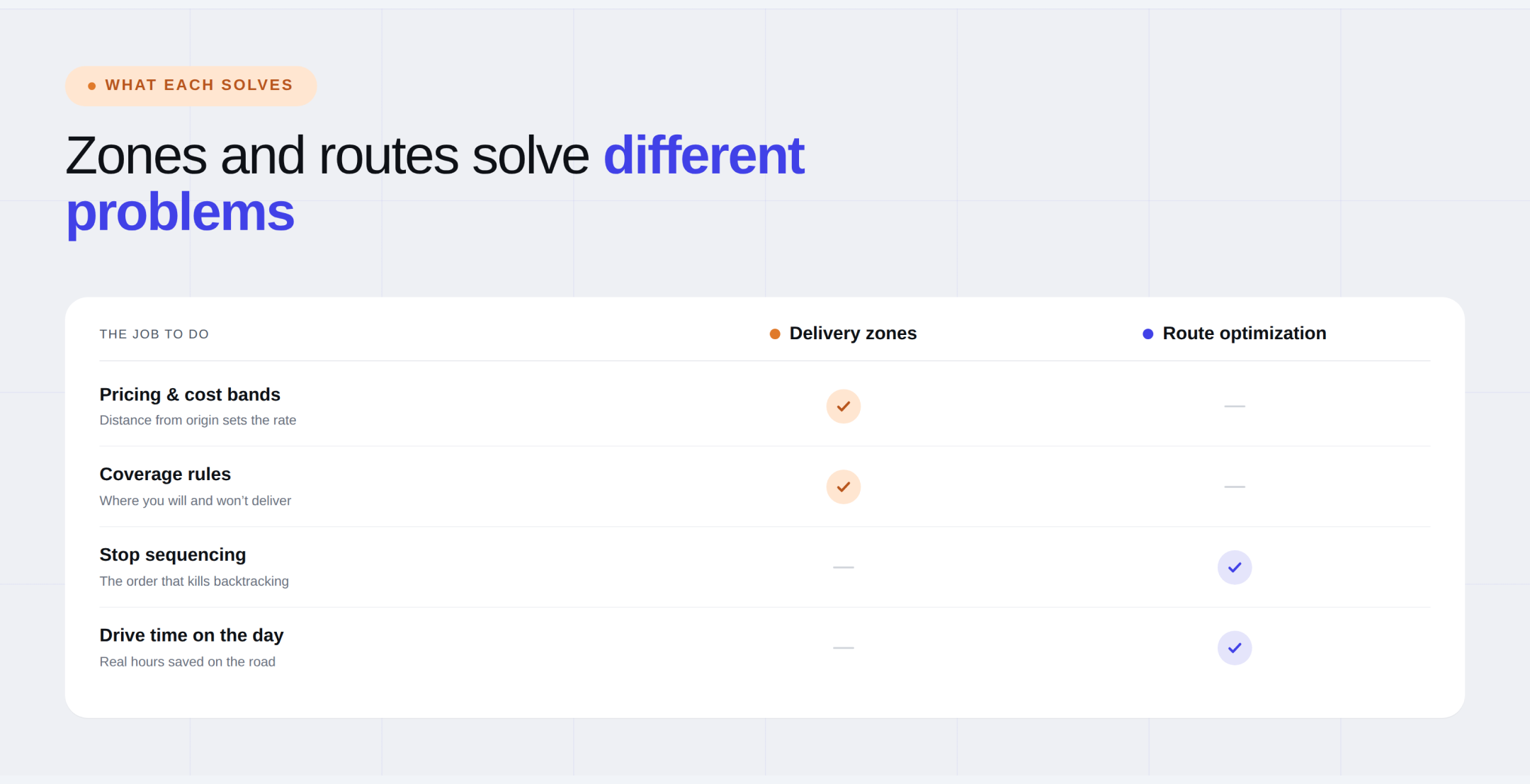
Imagine two local businesses delivering around the same city. The first one spends time defining where it will and will not deliver. That may help it avoid the worst outlier addresses. The second one takes the same local stop list and builds a cleaner route with better ordering, realistic time windows, clear notes, and faster navigation handoff. On most ordinary days, the second business is the one more likely to save actual hours on the road. Zones limit the work. Route optimization improves the work you already accepted. This comparison is a reasoned takeaway from how carrier zones are described by USPS and Pitney Bowes.
This does not mean zones are useless. They still matter when your business ships nationally through parcel carriers, when you are trying to explain shipping charges, or when you need simple business rules about how far you are willing to serve. Pitney Bowes is right to connect zones with cost control, delivery timing, warehouse placement, and carrier choice because those are classic shipping questions.
It just means zones should not be confused with route optimization. One helps you think about distance and shipping structure. The other helps you move through the day with less waste. For Optiway readers, that distinction is important because the product’s public feature set is clearly centered on multi-stop route planning, not on drawing or managing service areas.
For most local businesses running their own deliveries, route optimization usually saves more time than obsessing over delivery zones for small business. Zones can still be useful in the background as a business rule or a shipping concept, but they are rarely the thing that fixes a bloated Tuesday route. Time disappears in poor sequencing, late adjustments, weak stop details, and too many unnecessary miles between doors. That is exactly the layer Optiway is built to improve.
A good way to think about it is this: use zones to decide the shape of your delivery promise, and use route optimization to decide how the work actually gets done. If the goal is faster daily execution, cleaner stop order, and less wasted drive time, route optimization is usually the sharper tool.
The original shipping-zone logic still matters. Distance affects cost. Origin and destination matter. Carriers price long hauls differently from short ones. None of that changes. But for a local route business the more urgent question is usually not “What zone is this address in?” It is “Why did this route take so long?” Most days, the answer lives inside the route, not around the edges of a service map.
Best Route Planner App for Same Day Delivery Drivers
Same-day delivery gets messy fast when routes change by the hour. Optiway helps drivers plan smarter stops, save time, and keep ETAs under control.
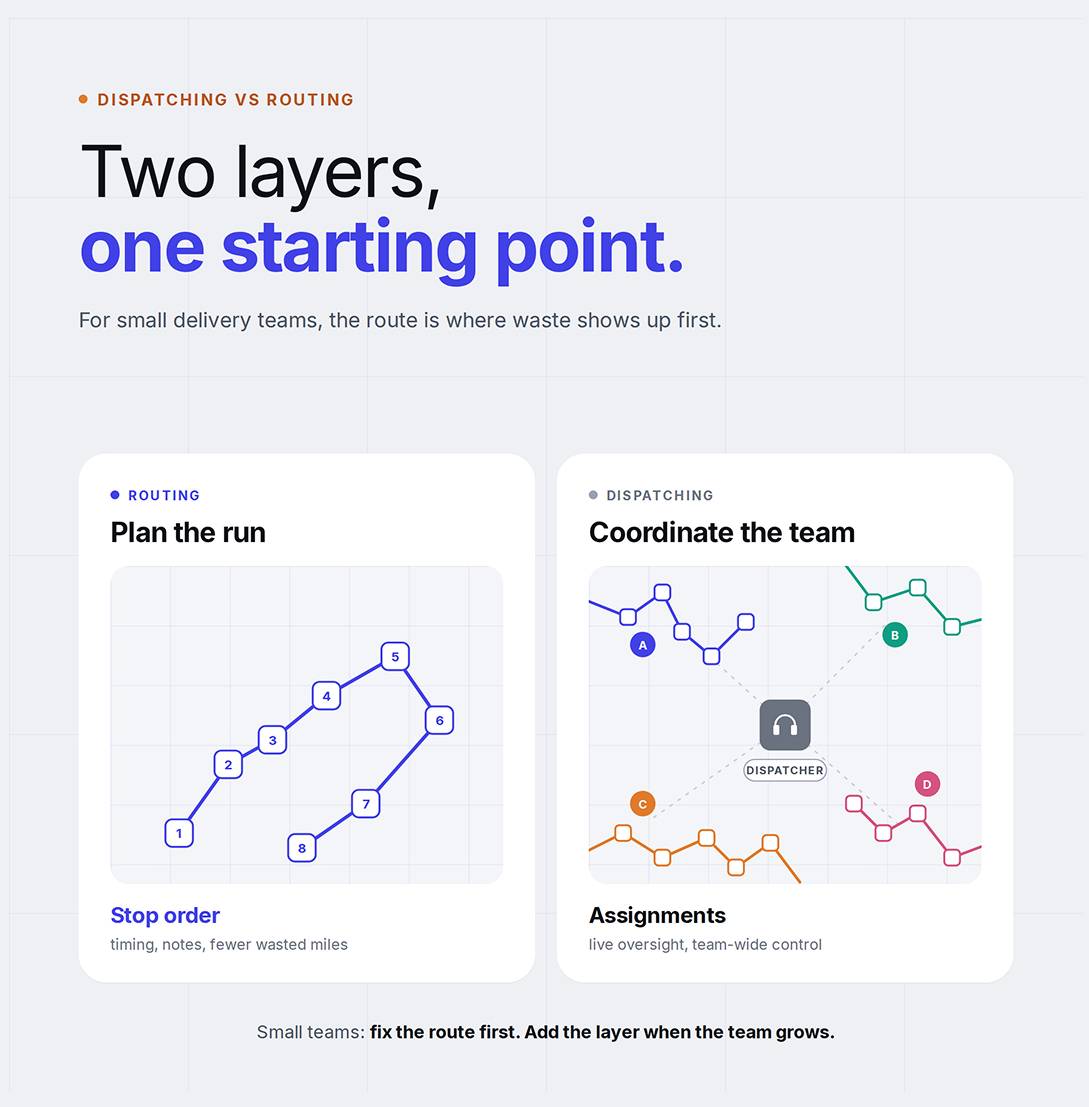
Dispatching vs Routing: Why Small Delivery Businesses Start With Route Optimization
Optiway explains why small delivery businesses usually get more value from better route optimization before adding heavier dispatch workflows.
Why Google Maps Falls Short for Truck Routes
Where a navigation app stops being enough for commercial multi-stop routing.
Plan, assign and track every driver — live, from one dashboard.